| |
Graphical
workshop for designing and simulating event correlation rules
with time constraints
|
| |
|
| |
 Product
Information (French) Product
Information (French) |
| • |
Multi-window
graphical editor |
| • |
Graphical
representation of correlations |
| • |
XML
format for data |
| • |
Data
export to Excel |
| • |
HTML
report generation |
|
Correlation
Studio helps case study designers relate events which must
happen within a specific time frame when, in order for a particular
situation
to be identified, not only a given set of events must occur in
a strict order but each event must happen within a limited time
range.
Dealing with pending conditions or related events which can be
notified in different orders is no more a puzzle.
Often, correlation system designers are overwhelmed by the problem.
They are facing logs with thousands of alarms and they have only
a vague idea of how some of them might be related. Correlation
Studio includes a search engine which can help finding events
which are repeated during a given period of time. From just a
small set of events, the engine can find other events which were
repeated too over the same period. This gives designers a
good starting point.
Definition
A set of events related by time constraints is called a chronicle.
Editing
An event, in a broad sense, is just a filter on a list of values
(eventType equipmentAlarm probableCause processorProblem ...).
It's described by combining comparison functions on individual
fields ((eventType = equipmentAlarm) AND (probableCause = processorProblem)).
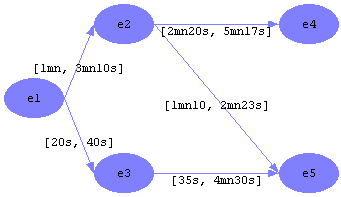
The
different events in a chronicle are represented by a graph. The time constraint between two events is shown on their link. |
| |
|
| |
Simulation
Designing rules with chronicles is one part of the problem. Checking that chronicles
indeed correlate events is just as essential.
Correlation Studio can apply a chronicle on different sets of
events, showing how many times the chronicle proves to be true. The designer
can then validate
the chronicle. |
| |
|
| |
Searching
Correlation Studio includes a search engine which counts how many
times pairs of events are found in a log over a given period of time.
The result is shown in a table which can be exported to Excel for
analysis. Finding meaningful pairs of events is a good way to start
building chronicles. |
| |
|
| |
Make
a simulation in 3 steps |
| |
With Correlation
Studio, users can quickly and easily simulate
a chronicle on a log of events.
This is carried out in three steps:
|
Click
on an image
for a larger view
|
1
- Specifying correlated events
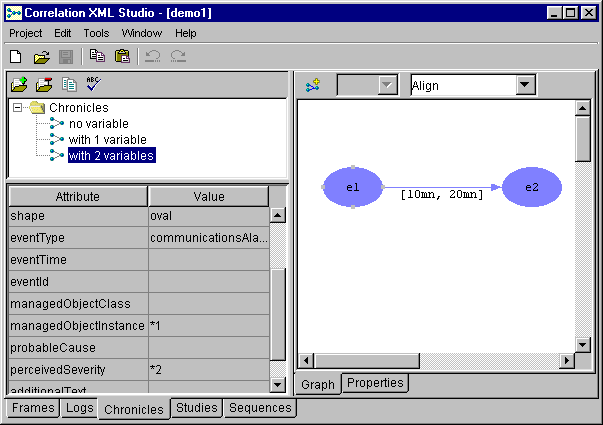
For each chronicle, define the different events by describing
filters, link them with a graph and specify the time
range between two events directly on the graph. |
|
2
- Loading a log of events
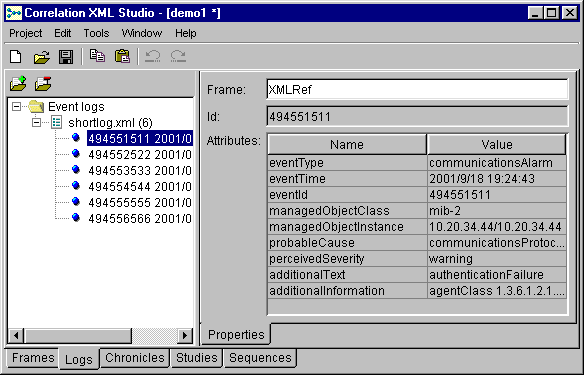
To test a chronicle, load a series of events from an XML
file. |
|
|
3
- Applying the chronicle
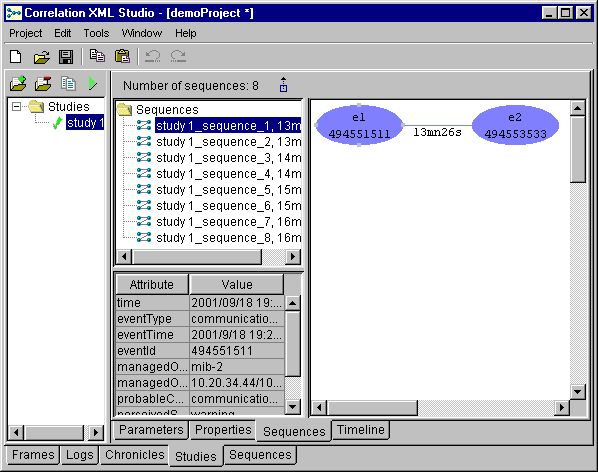
Apply a chronicle on a log to check if the different sequences
of events which have been found are correct.
A
timeline view is available: click
here
|
|
|
| |
|
| |
Assistance |
| |
|
| |
inWay
professional services can assist your company ; we can:
- personalize
the workshop for your specific set of events,
- develop
specific modules,
- train
your people to the method and the workshop,
- help
designing the complete system and moving it to the real world.
|




















 PRODUCTS